Agents for Scientists
Lars Schöbitz
September 29, 2026
Welcome
Welcome back
- In July you learned the workflow: clone, commit, branch, pull request, review, merge.
- Today one new participant joins that workflow: a coding agent.
- Subject matter expertise now matters more than programming skill.
Two room rules
- Never make another human read AI slop.
Read everything it does. Tell humans what you want feedback on. Every round ends with the same question: would I merge this?
- Commit often.
A commit is a checkpoint you can return to and a line in the record. Today: a commit after every run that changed a file, one pull request per sprint.
Spectrum line
Stand along the tape line.
- Left end: never used AI for research. Right end: use Claude Code every day.
- Two voices from each end.
- Re-sort: how much do you trust the output? Two voices again.
The goal today
- The goal today is not a finished data analysis.
- The goal is the same level for everyone: working with Claude Code and the ideas behind it, such as plan mode, issues, review, CLAUDE.md, skills and the record.
- For some of you the tool is new. Some of you already use these ideas.
- Already experienced? You are welcome to explore further, but follow the instructions first.
Four questions
- What must never go in? The agent reads whole folders. Personal and sensitive data never go into a repository, private ones included.
- How do I know this is right? Most useful on work you could have done yourself, least trustworthy where you cannot check it (Doctorow, 2026).
- Could I recreate it if the AI were gone? Fine that the AI made it. A problem when it has to stay in the loop for you to change it.
- What do I say, and to whom? Declare the tool as a method. Do not cite the model as a source.
With your neighbour, two minutes each: which one worries you most, and why?
How the day works
- The same path twice: question, agent, commits, pull request, release.
- Sprint 1, before lunch: three questions of your own, one framed run, then studio cards on your repository with a commit after each, a pull request you merge yourself, release v0.1.0. Fast and rough, on purpose.
- Sprint 2, after lunch: a plan you edit, issues a colleague reviews, a run that continues from your phone, a reviewed pull request, a CLAUDE.md, release v0.2.0, one declaration over both.
- Every round ends with the same check: would I merge this? Today, we merge.
- Two snack breaks, each with a question to take with you. The day closes with a zine.
The variable
| Round | Who reads the files | Who decides the steps | Who reviews | Where the instructions live | Where the result lives |
|---|---|---|---|---|---|
| 0 No AI | you | you | nobody | your head | a Word file on your laptop |
| 1 Chat | you paste them | you | you | the chat box | a chat thread in your account |
| 2 One line, sprint 1 | the agent | the agent | you, afterwards | one line | files and a commit in your repository |
| 3 Plan mode, sprint 2 | the agent | you, before anything runs | you | a plan you can edit | a plan file, then commits |
| 4 Issues and review | the agent | you and a colleague | a colleague, twice | GitHub issues | a reviewed pull request |
| 5 CLAUDE.md and skills | the agent | you and a colleague | a colleague | the repository | a tagged release |
Two rungs today
- Very low stakes: implement it. Sprint 1.
- Low stakes: plan, then implement.
- Medium stakes: plan, review the plan, implement, review the implementation. Sprint 2.
- High stakes: design first, then repeat the cycles.
Note
The workflow is not the same for every task. Which rung a task gets is the first decision, every time.
Learning objectives
By the end of this workshop, you will be able to:
- Run an agent inside the Git workflow: give it a task, have the plan reviewed and written as issues before any code exists, then review the pull request and accept or reject it.
- Judge the difference a plan makes: compare one line against a reviewed plan, and say what changed and why.
- Judge the difference documentation makes: a plain CSV against a data package, a bare repository against one with a template, a codebook and a CLAUDE.md.
- Declare agent use: point to the record your workflow produced, up to a tagged release, and say what it shows.
Schedule
| Time | Block | Rounds |
|---|---|---|
| 08:30 - 09:00 | Arrival and coffee | Setup clinic |
| 09:00 - 09:45 | Opening: security, literacy, transparency, disclosure | Your question bank |
| 09:45 - 10:20 | Current state, safety rails, the commit rule | Rounds 0 and 1, then the skills |
| 10:20 - 10:35 | Snack break | A question to take with you |
| 10:35 - 12:00 | Sprint 1: first run, studio cards, ship v0.1.0 | Round 2: one line, your cards, a commit each, release v0.1.0 |
| 12:00 - 13:00 | Lunch | A question to take with you |
| 13:00 - 13:20 | Between sprints: what v0.1.0 shows, folders and files | Your plan runs while you reflect |
| 13:20 - 14:10 | Sprint 2: plan mode, issues, partner review | Rounds 3 and 4a: plan mode, issues |
| 14:10 - 14:20 | Hand-over to the phone | Round 4b starts |
| 14:20 - 14:40 | Snack break: walk with your agent | Round 4b runs from your phone |
| 14:40 - 15:36 | Sprint 2: review, CLAUDE.md, review comments, merge | Round 4b: the pull request, round 5 |
| 15:36 - 16:06 | Sprint 2: ship v0.2.0, declare both | Release v0.2.0 |
| 16:06 - 16:30 | Disclosure rules in the making: two records against the draft rules | Your two records against the draft rules |
| 16:30 - 17:00 | Close: the zine |
Your turn: your question bank
On the printed question sheet, three questions your data can answer. One sentence each.
- One you already know the answer to. To check it.
- One you do not. To explore.
- One your data cannot answer. To catch it.
Swap with a neighbour. Make their question 1 20 percent more specific (Wickham & Bryan, 2026): which column, which unit, which comparison. Write the sharper version in box 4. Pin the sheet on the wall.
Sticky note on your laptop when your sheet is on the wall.
The instructor’s questions
agentsforsci-ghe/fstp-eval-india, one PDF: a 2023 evaluation of 69 treatment plants in eight Indian states.
- Which of the 47 FSTPs meet the discharge standard of 30 mg/L BOD, and how does BOD removal compare across treatment technologies?
- What are the helminth egg counts in the treated effluent per plant?
Cloned at ~/Documents/gitrepos/gh-org-agentsforsci-ghe/fstp-eval-india. Question 3 is the one the report cannot answer.
Current state, safety rails, the commit rule current state
Round 0: no AI current state
| Who reads the files | Who decides the steps | Who reviews | Where the instructions live | Where the result lives |
|---|---|---|---|---|
| you | you | nobody | your head | a Word file on your laptop |
The steps of a paper, as you do them now current state
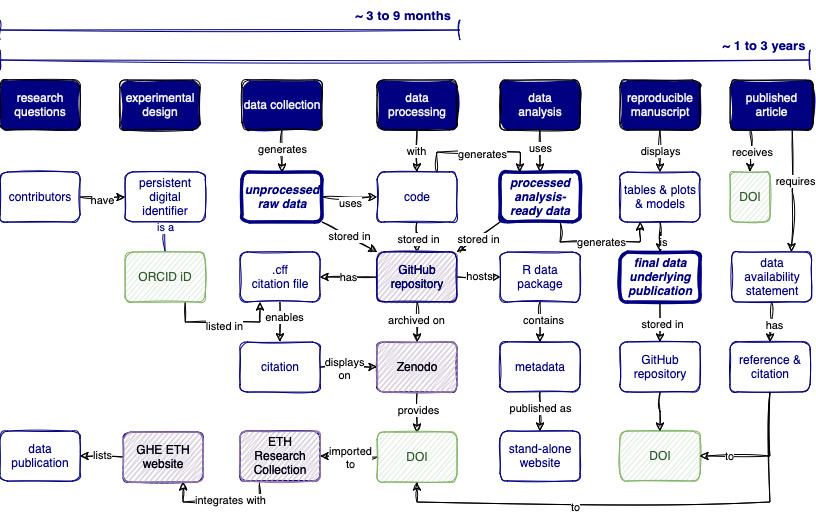
Today touches five of the boxes: data processing, data analysis, the manuscript, the repository, the release. Diagram from the group’s data management strategy, https://github.com/Global-Health-Engineering/concept-maps.
Where does AI sit in your workflow today, if anywhere?
Round 1: chat current state
| Who reads the files | Who decides the steps | Who reviews | Where the instructions live | Where the result lives |
|---|---|---|---|---|
| you paste them | you | you | the chat box | a chat thread in your account |
My turn current state
Sit back and watch.
- I upload the report PDF into the Claude chat and ask question 1. Then I ask for receipts: which page, which table.
- I ask question 3, the one the report cannot answer.
- Note down any questions as they come up. We pick them up right after.
Where did that go? current state
| The PDF | on Anthropic’s servers, in my account |
| The answer | in a chat thread, in my account |
| To continue tomorrow | copy it from the old thread |
| To share it | a screenshot |
| To redo it | ask again, get a different answer |
Nothing is in the project. Nothing is versioned. Nobody can check it.
Our turn: safety rails
In the terminal
Go to
~/Documents/gitrepos/gh-org-agentsforsci-ghe/<your repo>, not one level up. Typeclaude.Press Shift+Tab with me until the line under the box says auto mode on.
Type:
Create a branch called dev and switch to it. If dev already exists, switch to it.
/context
Sticky note when /context has printed and your line says auto mode on.
Four keys
| Key | What it does |
|---|---|
| Shift+Tab | cycles the mode: auto, manual, accept edits, plan |
| Esc | stops a run |
| Esc, Esc on an empty box | lists earlier turns; pick one to go back to |
| Up arrow | brings back your last prompt |
Stuck on something on your screen? Take a screenshot, drag it into the Claude Code box, then ask for what you want.
Our turn: one commit by hand
In RStudio, your own repository, branch dev
- New text file,
questions.md, at the top of the repository. Type your three questions. Save. - Git pane: stage it, message
docs: add my three questions, commit. The way you did in July.
Sticky note when the commit is in.
Who commits, and how often
- Do all commits yourself. You just did.
- Tell the agent when to commit. Sprint 1.
- Let the agent commit. You write the issues and open the pull request. Sprint 2.
- Let the agent make the whole pull request.
Commit after every run that changed a file. One pull request per sprint. The pull request skill pushes and tells you how many commits went up.
Our turn: two skills
In Claude Code
/plugin marketplace add Global-Health-Engineering/skills/plugin install ghe-skills@ghe-skills/exit, thenclaudeagain.
Sticky note when /ghe-skills:commit shows up in the command list.
Snack break
Please get up and move! Back at 10:35.
What in your data folder would you not want a model to read?
Sprint 1: first run, studio, ship v0.1.0
The day sheet
| Run | What happened | What it assumed | Minutes it ran | Would I merge this? | Committed? |
|---|---|---|---|---|---|
| First run | |||||
| Card |
- One row for every run, all day.
- Fill it right after the run, while you still remember.
- “Minutes it ran” is the clock time from your prompt until the agent stops.
- You need it after lunch, when we look back at v0.1.0, and for page 2 of your zine.
Round 2: one line
| Who reads the files | Who decides the steps | Who reviews | Where the instructions live | Where the result lives |
|---|---|---|---|---|
| the agent | the agent | you, afterwards | one line | files and a commit in your repository |
Your turn: the framed run, then commit
In Claude Code, your own repository, branch dev
Type this and nothing else:
Answer the following question using the data in this repository and write up the result as a Quarto manuscript that renders to DOCX: your question 1
Watch the tool calls. Do not intervene.
When it stops:
/ghe-skills:commit. Read the message it proposes. Fill the first row of your day sheet.Done early? Open the manuscript
.qmdand read it. Ask for changes if you like. After every prompt that changed a file, run/ghe-skills:commit.
Sticky note when the first commit is in.
What scrolled past
- Every line was a tool call: read a file, list a folder, write a file, run a command.
- Each line is a step you would otherwise do by hand: open a file, copy it into a chat, paste the answer back. Here a program on your laptop does it. The model on the server only ever sees what that program sends it.
- The result is files and a commit in your repository. Compare the chat: a thread in an account.
The studio: cards 1 to 5
- The question you cannot answer yet. Ask your question 2 and watch what it assumes without asking.
- The question the data cannot answer. Ask your question 3. Does it say the data cannot answer it, or does it make something up?
- The codebook. Ask it to describe every file in
data/and write a codebook, one row per variable. - One figure, rendered (recommended). Ask for one figure for your question 1 in the manuscript, then render it to DOCX.
- Five references. Ask it for the five most relevant references in your Zotero library.
The studio: cards 6 to 10
- The README, read by a stranger. Ask what a new colleague would not understand in your README.
- What does it know right now. Type
/context, then ask what it has read and what it has not. - Name the tool. Ask it to use
git logto tell the history of your repository in five lines. - The same task twice. Start a new session and run card 1 again, word for word. What changed?
- Wild card. Ask anything you are curious about.
Curious? Go further. Ask it about what just happened: why did you do that? What does this line do?
Your turn: the studio
In Claude Code, your own repository, branch dev
- Pick any cards, in any order. At least two. Card 4 for everyone.
- Changed a file?
/ghe-skills:commit. Either way, fill one row of your day sheet. - If it asks, answer.
Raised hand when a card is stuck for two minutes, then move on.
Stand up: the question wall
- Stand up and walk to the question wall.
- Read three questions that are not yours.
- Put a dot next to the one you would most like answered.
- Back to your card.
The release path
- Pull request merged into
main. - Manuscript rendered to DOCX, in RStudio.
- Tag
v0.1.0. - Release on GitHub, with the DOCX attached. Source in git, artifact on the release.
devsynced withmain.
Sprint 1 does it rough: no reviewer, whatever rendered. Sprint 2 does it properly.
Our turn: ship v0.1.0, the pull request
In Claude Code
/ghe-skills:open-pr. It pushes first and tells you how many commits went up. When it offers the test plan, answer no.
On github.com
- Open the pull request. One minute on Files changed. Merge it yourself. No reviewer, on purpose.
In Claude Code
Type:
Switch to main and pull.
Main and dev now hold the same work.
Our turn: ship v0.1.0, the release
In RStudio
- Open the manuscript and press Render. A DOCX appears next to it.
In Claude Code
Tag and release:
Tag v0.1.0 and create a GitHub release. Attach the DOCX if it rendered; if not, say in the release note that the manuscript does not render yet.
Sync dev:
Switch to dev, merge main into it, and push.
Sticky note when the release page is up. Download the DOCX: the file you would email a co-author without Git.
The 18 tasks
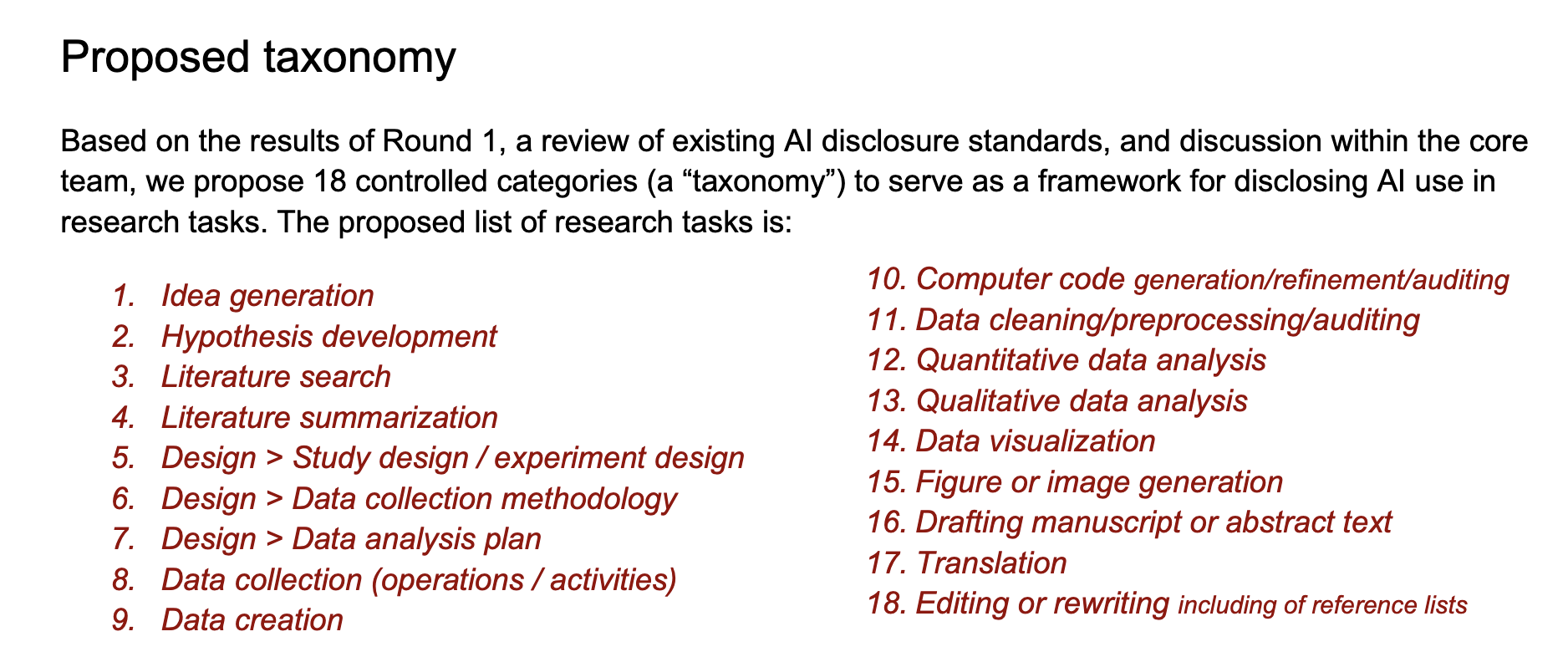
The proposed standard for declaring AI use in research lists 18 tasks; you tick the ones AI touched (International Science Council, 2026). Screenshot: International Science Council, Consultation Round 2, preparatory reading.
Lunch
Back at 13:00. Bring your day sheet. The afternoon starts with two minutes at the keyboard, then a look back at v0.1.0.
Of the 18 tasks in writing a paper, which did the agent touch in sprint 1, and which would you never hand over?
Over lunch, pick your sprint 2 question: question 1 done properly, or question 2.
Between sprints: what v0.1.0 shows
Our turn: start your plan
In Claude Code, your own repository, branch dev
/clear. A new conversation. Your files stay.Shift+Tab until the line under the box says plan mode on.
Type, with your sprint 2 question:
Answer the following question using the data in this repository and write up the result as a Quarto manuscript that renders to DOCX: your sprint 2 question. Plan only. Do not run any analysis or write any file yet.
Leave it running. Open your v0.1.0 release page next to it.
Reflect on v0.1.0
Release page open on your screen, day sheet in hand.
- What did it assume without asking?
- Where did it put files, and how did it name them?
- How many commits did sprint 1 produce? Hands up: three or more.
- Would I send v0.1.0 to a co-author?
Where repositories live
~/Documents/gitrepos/
├── gh-org-gitforsci-ghe/        July
├── gh-org-agentsforsci-ghe/     today
│   └── <your repo>/             <- the agent starts here, never one level up
└── gh-rainbow-train/            a personal account
└── website/- One folder per GitHub organisation (
gh-org-), one per personal account (gh-), side by side. gitreposstays out of folders that sync to a cloud drive.- The agent reads the folder it starts in. Start inside the repository.
Inside a repository
<your repo>/
├── README.md
├── CLAUDE.md
├── data/
│   ├── raw_data/
│   ├── derived_data/
│   └── metadata/codebook.csv
├── analysis/
├── docs/reports/
└── src/
File names: lowercase, dash as separator, short, a two-digit prefix for scripts.
01-read-data.R
Final analysis (v2) LS.R
Where would your v0.1.0 files belong in here?
Our turn: look inside your files
In RStudio
- Open the manuscript
.qmdthe agent wrote. Text you can read. - Open the CSV in the editor (View File, not Import). Type one row at the bottom. Then undo it and save nothing.
On the screen
- I unzip the DOCX from the release. Inside: folders of XML. An XLSX opens the same way.
The source is text you can read, type and diff. The DOCX is generated from it, so never edit the DOCX.
Sprint 2: plan mode, issues, partner review
Round 3: plan mode
| Who reads the files | Who decides the steps | Who reviews | Where the instructions live | Where the result lives |
|---|---|---|---|---|
| the agent | you, before anything runs | you | a plan you can edit | a plan file, then commits |
My turn
Sit back and watch.
Note down any questions as they come up. We pick them up right after.
Your turn: plan mode
In Claude Code
Read the plan that came back. Would I merge this plan?
Reject it in one sentence that points at the template and the naming rules.
Shift+Tab until the line says auto mode on again. The file only lands in the repository after leaving plan mode.
Type:
Write the plan as a markdown file in this repository that I can edit.
/ghe-skills:commit. The agent’s plan, one assisted commit.
In RStudio
- Change one line of the plan file. Save.
- Stage, commit, the way you did this morning. Your line, one commit by hand. Fill one row.
Sticky note when both commits are in.
With your neighbour: what did one sentence change?
Round 4: issues and review
| Who reads the files | Who decides the steps | Who reviews | Where the instructions live | Where the result lives |
|---|---|---|---|---|
| the agent | you and a colleague | a colleague, before code exists and again on the pull request | GitHub issues | a reviewed pull request |
Your turn: the issues
In Claude Code. The prompt is also in the chat room.
Turn the plan into four issues on this repository. Each issue gets a title, what done looks like in at most five checkboxes, and the files it touches:
- Organise the repository following the template.
- The analysis inside the Quarto manuscript with format: docx, one figure from a code chunk.
- Five references from my Zotero library.
- A methods paragraph.
Sticky note when the issues are on GitHub. Fill one row.
Find your review partner
Move to sit with your partner (neighbour pairs, triple if odd).
On github.com
- Open your partner’s issues 1 and 2, the two the agent implements next.
- Comment where a step is unclear or where done is not defined. Before any code exists.
Hand-over to the phone
Our turn: hand over to your phone
In Claude Code
Type:
Implement issues 1 and 2 on the dev branch. Run /ghe-skills:commit after each issue, then push. Ask me when you are unsure.
/remote-control. A link and a QR code appear.
On your phone
- Scan the code with the Claude app, or open Code in the app.
- Send: “Status?”
Laptop plugged in, lid open, terminal open.
Snack in hand, go outside.
Snack break: walk with your agent
Back at 14:40. Check progress every few minutes. Answer what it asks. Do not start new tasks.
What does it ask you, and what does it decide alone?
Sprint 2: review, CLAUDE.md, review comments, merge
What did it ask you?
What did it ask you? What did it decide alone?
One note, one line. It goes on the oversight flipchart in the disclosure block.
My turn
Sit back and watch.
Note down any questions as they come up. We pick them up right after.
Your turn: TODOs, then the pull request
In Claude Code, at the laptop
- Read the diff. If the agent is not done, it finishes now.
In RStudio
- Open the manuscript. Wherever you would not merge it, write a line
TODO: what has to change. Save. Commit by hand.
In Claude Code
Type:
Work through the TODOs in the manuscript. Remove each one when it is done. When all are done, run /ghe-skills:commit.
Read the diff again. Then
/ghe-skills:open-pr, answer no. The second and last pull request of the day.
Sticky note when the pull request is open. Fill one row.
Your turn: partner review
On github.com
- Open your partner’s pull request. Files changed.
- Leave at least three comments where you see fit, for example something unclear, a number to check or a missing step. Click the + next to a line, write, then Add single comment.
- Do not approve or merge yet. In round 5, Claude reads your comments and works on them.
- Compare with the sprint 1 pull request nobody reviewed.
CLAUDE.md
CLAUDE.mdin the project folder: versioned, shared with collaborators, in the record.- It holds what is true for this project: the template, the naming rules, where the codebook is, how to render.
- Told the agent something three times? Put it in
CLAUDE.md. - A user level file (
~/.claude/CLAUDE.md) exists on your machine, applies to every project, and never appears in the repository.
CLAUDE.md against a skill
- A skill has two parts: the when is always sent to the model, the what loads on demand.
- Lots of text for one purpose: make it a skill.
- Never write skills prospectively. Extract them from a conversation that just happened.
CSV against data package
Placeholder: two screenshots from the rehearsal, the same short prompt on a plain CSV and on the installed openwashdata package. On the CSV it guesses; on the package it reads the documentation and names the variables.
Documentation you wrote for a colleague is documentation the agent needs too.
Round 5: CLAUDE.md and skills
| Who reads the files | Who decides the steps | Who reviews | Where the instructions live | Where the result lives |
|---|---|---|---|---|
| the agent | you and a colleague | a colleague | the repository | a tagged release |
Your turn: round 5
In Claude Code
Type, then
/ghe-skills:commit:Write a CLAUDE.md for this repository from what we did today: the folder template, the naming rules, where the codebook is, how to render the manuscript. Then fill data/metadata/codebook.csv for the derived table.
/exit, thenclaude. A new session that knows only CLAUDE.md and your files.Type:
Read the review comments on my open pull request and work on each one. Reply to each comment with what you changed. Then run /ghe-skills:commit and push the dev branch.
With your partner: were your comments handled? Did it follow CLAUDE.md without being told? Would I merge this?
Sticky note when the push is done.
Partner merges
On github.com, your partner’s pull request
- In Conversation, find your three comments. Did Claude reply? Is each one handled?
- In Commits, find the commits since your review.
- In Files changed, find
CLAUDE.mdand read it. - Would I merge this? Then Merge pull request.
Sticky note when it is merged.
Sprint 2: ship v0.2.0, declare both
Our turn: ship v0.2.0, main and render
In Claude Code
Type:
Switch to main and pull.
In RStudio
- Open the manuscript and press Render.
Our turn: ship v0.2.0, the release
In Claude Code
Tag and release:
Tag v0.2.0 and create a GitHub release with the DOCX attached.
If it did not render, the release note says so, as in the morning.
Sync dev:
Switch to dev, merge main into it, and push.
On github.com
- Open the two release pages side by side.
Sticky note when both release pages are up.
My turn
Sit back and watch.
Note down any questions as they come up. We pick them up right after.
Your turn: your declaration
In Claude Code
Write a declaration of AI use for this repository from the first commit to tag v0.2.0. Read the commit history and its trailers, the prompts folder, the issues, the pull requests and CLAUDE.md. Say which files an agent touched, in response to which instruction, who reviewed what, and what changed between v0.1.0 and v0.2.0. Put it in the release notes of v0.2.0.
Sticky note when the release notes are updated. Fill the last row. Two volunteers read one line aloud.
Disclosure rules in the making: two records
Two sides of the room
What should a paper say about AI use?
Left side of the room
Only whether AI was used, yes or no. One rule everyone can follow.
Right side of the room
A yes or no says nothing. The paper should describe what the AI did and who checked it.
Stand on your side. Argue with v0.1.0 and v0.2.0 as evidence. Cross over if persuaded.
Three flipcharts
- Where does disclosure belong: spread through the sections, or gathered in one statement?
- Should every paper have to say when no AI was used, the way it states conflicts of interest?
- What should a paper say about who checked the AI’s work, and how?
One note per chart, one line each, from what the two records showed. Your note from 14:40 goes on the third chart.
What happens next
- The three flipcharts go to the AI working group of the Global Federation of Reproducibility Networks.
- Round 2 of the consultation closes on 16 October 2026.
- The chat room stays open.
Close: the zine
What you learned today
Matched to the four objectives from this morning:
- Run an agent inside the Git workflow: twice. A commit after every run, a pull request per sprint, two releases.
- Judge the difference a plan makes: v0.1.0 against v0.2.0, on your own data; ten cards with one line each against one sentence of correction.
- Judge the difference documentation makes: a bare repository against a template, a codebook and a CLAUDE.md.
- Declare agent use: one declaration written from two records.
Fold a zine
One A3 sheet each. Watch twice at the front, then fold.
- Fold in half the long way. Open.
- Fold in half the short way, then each half again. Open: eight panels.
- One cut along the middle crease, two panels long.
- Push the ends together. Fold into a booklet. Eight pages.
Eight pages
- Cover: a name for today’s paper, or for your agent workflow.
- My two sprints: v0.1.0 against v0.2.0, what changed and why. Your day sheet is the source.
- Who reviews: who I want reviewing the agent’s issues and pull requests, and who has a say in what an agent may touch.
- Where the instructions live: what goes into my CLAUDE.md, what stays in my head.
- What I will not hand to an agent, and what I hand over from tomorrow.
- and 7. Left free for feedback from others.
- Take-away: my one-line rule for working with an agent.
Work alone. Pens and stickers on the table. Music on.
The table
Zines in the middle of the table.
- Read at least three.
- Write on pages 6 and 7: something positive you noticed, a question, an encouragement.
- One note for a flipchart if you have one: open questions, learnings, what I still wanted to say.
Post-course survey, five minutes, anonymous: link in the chat room, now or tonight.
Thanks!
- Remove the two skills if you do not want to keep them:
/plugin uninstall ghe-skills@ghe-skills. The app on the phone can go too. - The chat room stays open. Take your zine home.
Slides created via revealjs and Quarto: https://quarto.org/docs/presentations/revealjs/
All material is licensed under Creative Commons Attribution 4.0 International.
References
Carpenter, T. A. (2026, August). We can now track AI-generated content. It doesn’t solve the real problem. The Scholarly Kitchen. https://scholarlykitchen.sspnet.org/2026/08/31/we-can-now-track-ai-generated-content/
Doctorow, C. (2026, July). Pluralistic: Human in the loop. Pluralistic. https://pluralistic.net/2026/07/28/hitl-ers/#ai-ai-oh
International Science Council. (2026). AI disclosure in research: Towards a global reporting standard. International Science Council. https://council.science/our-work/ai-disclosure-in-research/
Weaver, K. D., Seghers, B., McNeice, K., Perkins, M., Santamarina, S., Lingard, L., Tsybuliak, N., & Dijkstal, F. (2026, July). Guest post — research needs a shared standard for AI disclosure. The Scholarly Kitchen. https://scholarlykitchen.sspnet.org/2026/07/13/guest-post-research-needs-a-shared-standard-for-ai-disclosure/
Wickham, H., & Bryan, J. (2026, September). Modern R workflow. posit::conf 2026. https://github.com/posit-conf-2026/modern-r-workflow